


 BlueberryAlien
When im using the jogwheel to browse the track when it's playing, when I release it I want it to play from.the closest quantized beat. But currently when I release it it merely goes back to where I left off. Useless.
Also the loops also have the same problem. Theres a little arrow that keeps rolling even if theres a loop and when I release it it plays from the little arrow. No! I want to merely release the loop and let it play where it should, not "resume" in the track 30 seconds later. I come from DJuced and I was playing like this and was managing to make really clutch transitions but now I cant because this takes too long and is too clunky.
Also the loops also have the same problem. Theres a little arrow that keeps rolling even if theres a loop and when I release it it plays from the little arrow. No! I want to merely release the loop and let it play where it should, not "resume" in the track 30 seconds later. I come from DJuced and I was playing like this and was managing to make really clutch transitions but now I cant because this takes too long and is too clunky.
Mensajes Sat 14 Feb 26 @ 10:37 pm
 DJ VinylTouch
BlueberryAlien wrote :
When im using the jogwheel to browse the track when it's playing, when I release it I want it to play from.the closest quantized beat. But currently when I release it it merely goes back to where I left off. Useless.
Not sure what you are trying to explain here so it's best you be more detailed/try again.
Virtually no one playing track to an audience wants to browse that track while playing it, so I assume you mean a track you are cueing, and in that case the audience wouldn't hear it/jumping to the grid hardly matters/is just a convenience. It's also unnatural to be physically moving a track with the jogs and release and it becomes quantized in playback to the grid (real vinyl, which it was modelled after, doesn't work like that, and AFAIK Serato, Rekordbox and Traktor do not work like that), but there is a setting I think for that - quantizeScratch.
BlueberryAlien wrote :
Also the loops also have the same problem. Theres a little arrow that keeps rolling even if theres a loop and when I release it it plays from the little arrow. No! I want to merely release the loop and let it play where it should, not "resume" in the track 30 seconds later. I come from DJuced and I was playing like this and was managing to make really clutch transitions but now I cant because this takes too long and is too clunky.
Also the loops also have the same problem. Theres a little arrow that keeps rolling even if theres a loop and when I release it it plays from the little arrow. No! I want to merely release the loop and let it play where it should, not "resume" in the track 30 seconds later. I come from DJuced and I was playing like this and was managing to make really clutch transitions but now I cant because this takes too long and is too clunky.
You want to enable slip mode on the deck.
It seems like you are new here/coming from a different software, and have developed different habits from where you came from, and that's okay, but different platforms have different ways of approaching things, and that's also okay.
Take time to learn VirtualDJ. There are various resources:
- The User Manual
- The VirtualDJ VDJPedia Wiki
- This forum
If you don't understand how to do something, or can't find the info readily yourself, ask instead of ranting. The former shows you want to learn. The latter implies you don't want to learn.
Ultimately, remember there are many DJs using VirtualDJ successfully for their professional DJ careers for many years - it's trusted software that gets the job done, if you understand how to use it.
Mensajes Sat 14 Feb 26 @ 11:02 pm
BlueberryAlien
Actually I have to disable, not enable slip mode, and quantizescratch doesnt work, hence why im asking for help.
Mensajes Sat 14 Feb 26 @ 11:52 pm
BlueberryAlien
See?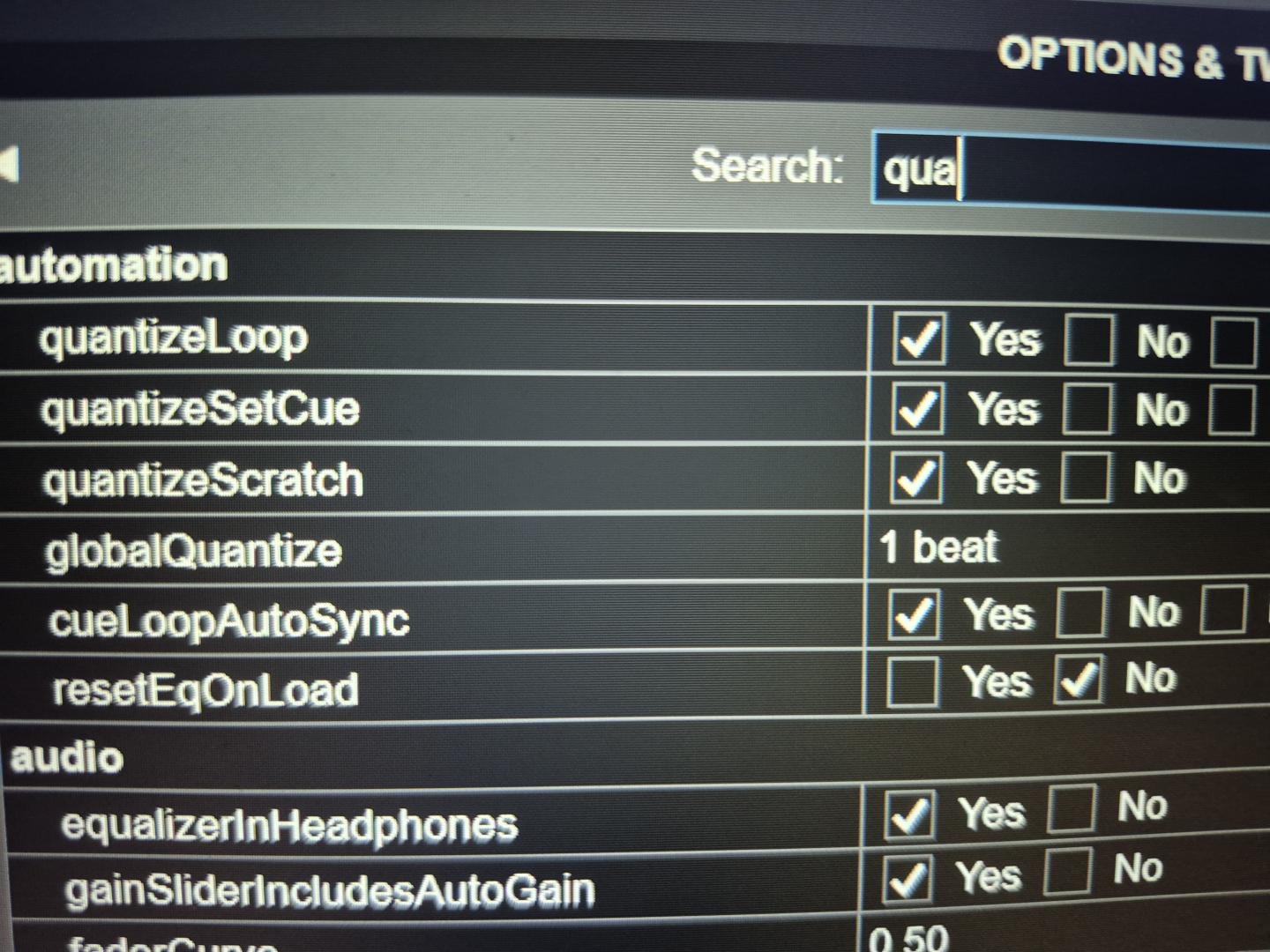
Mensajes Sat 14 Feb 26 @ 11:56 pm
DJ VinylTouch
BlueberryAlien wrote :
Actually I have to disable, not enable slip mode, and quantizescratch doesnt work, hence why im asking for help.
I still am not sure what you are trying to do in the first part (I'm guessing the second part is solved with disabling slip mode).
Maybe describe it a little more/provide a video of what you are trying to do in the other software?
Mensajes Sun 15 Feb 26 @ 12:29 am
BlueberryAlien
I'm just trying to quantize scratch.... like I release the jogwheel (browsing the track) and it aligns with the closest beat. Now the only workaround is to pause the track, align as best as i can and then press play. Now it will align. But IF the track is playing, quantize is not working at all.
Mensajes Sun 15 Feb 26 @ 12:38 am
BlueberryAlien
Here's the video of djuced with my ancient controller with working quantized jogwheel
https://files.catbox.moe/x8wn6i.mp4
https://files.catbox.moe/x8wn6i.mp4
Mensajes Sun 15 Feb 26 @ 12:54 am
DJ VinylTouch
Took a look at your video. There is no actual audio I heard coming out, so I honestly don't know what exactly you are trying to achieve - I can at best guess.
Based on looking at what you are doing though, you have two options:
Based on looking at what you are doing though, you have two options:
- If you want the song to restart while playing like you didn't scratch at all
Play the incoming song, hit sync, scratch and release - If you want the song to line up on any random drop after scratching
Turn on beatlock (put that exact verb on a custom button or keyboard shortcut then press it) then scratch.
That will make VirtualDJ align the song by its grid, on drop to the nearest grid marker of the other song.
I would be careful in that mode, because I think everything pitch-wise getd synced, including pitch fader movements.
Mensajes Sun 15 Feb 26 @ 4:10 pm
BlueberryAlien
Beatlock is pretty damn close to what I was looking for! Thank you very much!
Mensajes Sun 15 Feb 26 @ 4:37 pm
BlueberryAlien
Last question for this issue. I assigned a button to enable disable beatlock, but it only works on one deck. How do I put switches for BOTH decks?
Mensajes Sun 15 Feb 26 @ 5:02 pm
DJ VinylTouch
Actions applied on a custom button are supposed to be deck aware.
If you want it to apply for all decks you can put a deck all in front it.
However, for this particular action, I'm not 100% sure if it makes sense to do that - beatlock needs to lock the tempo characteristics of a deck to another (the master deck), so in this case you probably don't really want it to be global (beatlock applied on the master deck doesn't really make sense to me, but perhaps others can chime in on expectations here as I almost never use that function).
You can always try it to see if it really does what you want.
If you want it to apply for all decks you can put a deck all in front it.
However, for this particular action, I'm not 100% sure if it makes sense to do that - beatlock needs to lock the tempo characteristics of a deck to another (the master deck), so in this case you probably don't really want it to be global (beatlock applied on the master deck doesn't really make sense to me, but perhaps others can chime in on expectations here as I almost never use that function).
You can always try it to see if it really does what you want.
Mensajes Sun 15 Feb 26 @ 5:15 pm
BlueberryAlien
Now with deck all applied infront of beatlock, the assigned button simply does not respond!
But from the little I played with, beatlock works independently from the master. The one with BL will lock onto the other track, the one who has none will just... not lock
But from the little I played with, beatlock works independently from the master. The one with BL will lock onto the other track, the one who has none will just... not lock
Mensajes Sun 15 Feb 26 @ 5:44 pm
DJ VinylTouch
From what I understood, the one yiu applied beatlock on will carry out is tempo changes and playback with respect to one you locked onto (the master deck). rom that point, moving the pitch on the master deck or the locked deck should cause changes on the other deck (i.e. you don't have to hit beatlock on every deck, beatlock on one deck + having a master deck that is not the same as the deck you hit beatlock on should ensure they sync).
Summary = just remove the deck all specifier (it shouldn't be needed)
Summary = just remove the deck all specifier (it shouldn't be needed)
Mensajes Sun 15 Feb 26 @ 6:04 pm
BlueberryAlien
Aw man... theres no way to nudge the jogwheel with beatlock...? It was possible on djuced..
Mensajes Sun 15 Feb 26 @ 6:25 pm