


 Ian Wild
The latest early access version of Virtual DJ, introducing AI video generation and the ability to easily create our own visual shaders, is a real step forward, and kudos to the development team for this excellent work.
However, the current visual manager is truly rudimentary and seems outdated.
With the arrival of these new features, we now need display options (list, thumbnail, etc.), sorting/filtering by type (shaders, AI video, type, name) to show/hide/categorize visuals based on their content. Perhaps the ability to create folders by category would also be helpful.
The ability to rearrange the order of visuals (move up/down or something similar) is also needed, as currently visuals are added sequentially, and I haven't found any way to change their order.
The ability to add/import our own external video sequences/loops not generated by the software's internal AI is also crucial.
The ability to attach a PNG/bitmap file when creating an AI video for integration, for example, allowing users to write a prompt asking them to use the attached PNG logo to render it in 3D, rotate it, and then overlay it onto any other AI content. Of course, these videos should be able to be marked as private and not exported to the shared AI video server.
And above all, much better integration of the visuals manager with the rest of the software interface. For example, perhaps as a sidebar that can be displayed in the browser, as is the case for the sidelist/automix/sampler/karaoke. This would be much more practical to manage on a single screen, as the current visuals manager window overlays the existing interface and is only truly useful with a dual-monitor setup.
I tried to optimize my display space (1920x1080) to keep the VDJ interface and the visuals manager permanently displayed, knowing that I send the visuals full screen to external monitors in extended desktop mode.
The best I could achieve is this, but when the manager window is in list view so that it occupies as little space as possible, the window's navigation scroll bar stops working. It's therefore impossible to navigate within it without being in thumbnail view, which requires increasing the width of the visuals manager window.
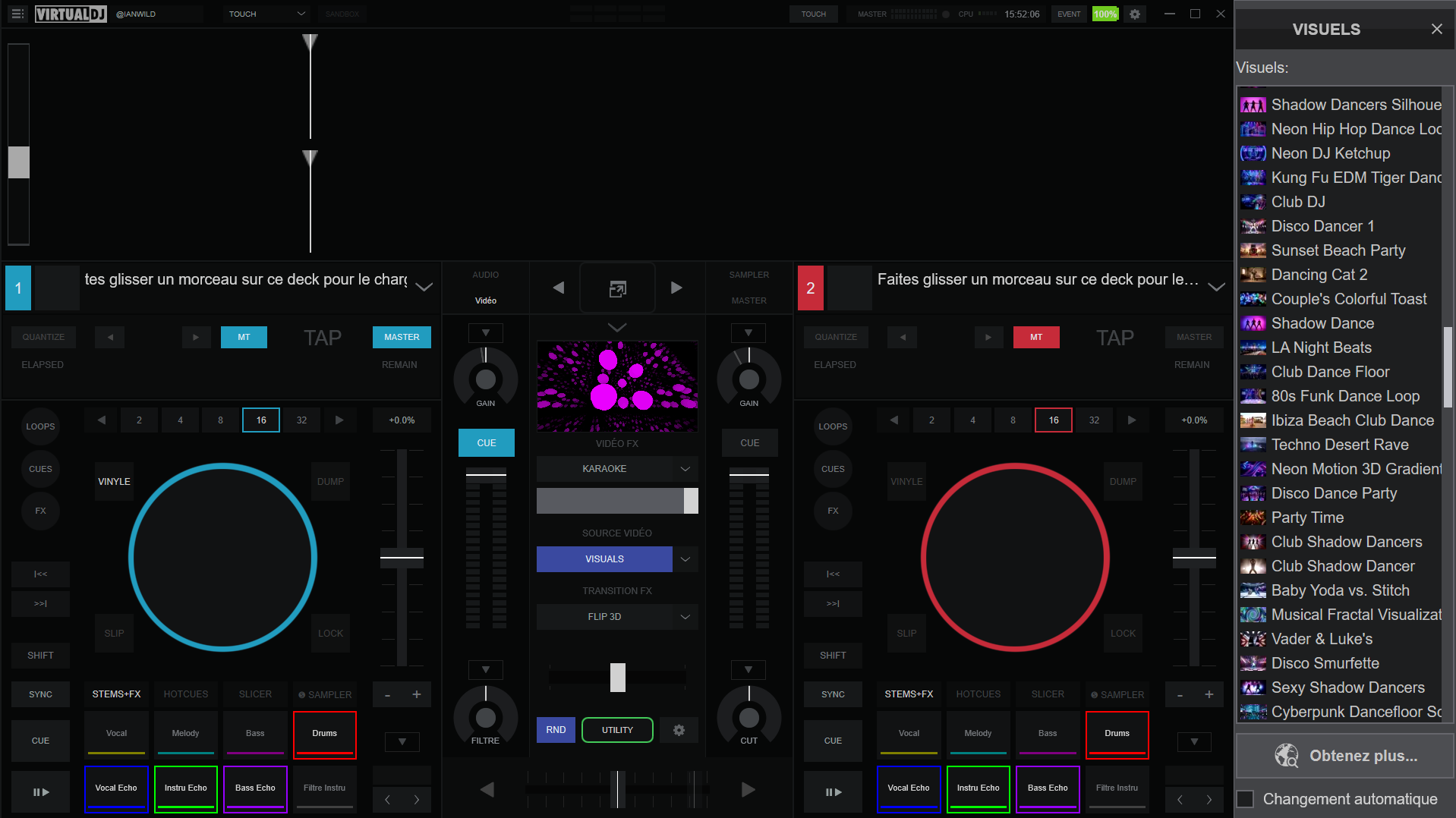
However, the current visual manager is truly rudimentary and seems outdated.
With the arrival of these new features, we now need display options (list, thumbnail, etc.), sorting/filtering by type (shaders, AI video, type, name) to show/hide/categorize visuals based on their content. Perhaps the ability to create folders by category would also be helpful.
The ability to rearrange the order of visuals (move up/down or something similar) is also needed, as currently visuals are added sequentially, and I haven't found any way to change their order.
The ability to add/import our own external video sequences/loops not generated by the software's internal AI is also crucial.
The ability to attach a PNG/bitmap file when creating an AI video for integration, for example, allowing users to write a prompt asking them to use the attached PNG logo to render it in 3D, rotate it, and then overlay it onto any other AI content. Of course, these videos should be able to be marked as private and not exported to the shared AI video server.
And above all, much better integration of the visuals manager with the rest of the software interface. For example, perhaps as a sidebar that can be displayed in the browser, as is the case for the sidelist/automix/sampler/karaoke. This would be much more practical to manage on a single screen, as the current visuals manager window overlays the existing interface and is only truly useful with a dual-monitor setup.
I tried to optimize my display space (1920x1080) to keep the VDJ interface and the visuals manager permanently displayed, knowing that I send the visuals full screen to external monitors in extended desktop mode.
The best I could achieve is this, but when the manager window is in list view so that it occupies as little space as possible, the window's navigation scroll bar stops working. It's therefore impossible to navigate within it without being in thumbnail view, which requires increasing the width of the visuals manager window.
Mensajes Sat 07 Mar 26 @ 2:55 pm
 DJ VinylTouch
+1 to this
Mensajes Sat 07 Mar 26 @ 5:14 pm
 djcel
djcel
It is already possible to create folders to classify them, and you can move in the list them via a drag'n'drap.
And in the worse case it is still possible to edit the xml with the list of visuals.
And in the worse case it is still possible to edit the xml with the list of visuals.
Mensajes Sat 07 Mar 26 @ 5:26 pm
Ian Wild
Yes, I found the option to create folders to categorize the visuals, but it's not practical because it further increases the width of the manager window with an additional column on the left. A drop-down tree view in a single column would be much better. You click on a folder, and it opens the visuals it contains directly below. This way, you could open/close a folder to choose to show or hide only the visuals in the category of your choice.
I also managed to get the ability to move visuals using drag and drop working, but for some reason, it only works if I increase the width of the visualization manager window.
I also managed to get the ability to move visuals using drag and drop working, but for some reason, it only works if I increase the width of the visualization manager window.
Mensajes Sat 07 Mar 26 @ 8:55 pm
 Adion
Adion
Fixed in 9229. When the window is too narrow, the folder list will move to a drop-down at the top
Mensajes Tue 17 Mar 26 @ 7:43 am
Ian Wild
Adion wrote :
Fixed in 9229. When the window is too narrow, the folder list will move to a drop-down at the top
It works, but Virtual DJ doesn't seem to remember the size and position of the visuals manager window.
Every time I close and restart Virtual DJ, I'd like the visuals manager window to automatically appear where I placed it during my previous session and retain its size.
Currently, I have to activate the preview and then click the gear icon to bring up the visuals manager each time I launch the software. Once open, the visuals manager window doesn't appear where I previously positioned it, nor does it retain the previously set size. I have to reposition it as I want.
However, Virtual DJ seems to remember the placement and size of the main software window.
It would also be nice to be able to adjust the font size of the visuals manager window independently of the font size used in the main window.
Mensajes Tue 17 Mar 26 @ 10:59 pm
 Jesse Li Starseed
Ian Wild wrote :
The ability to add/import our own external video sequences/loops not generated by the software's internal AI is also crucial.
The ability to attach a PNG/bitmap file when creating an AI video for integration, for example, allowing users to write a prompt asking them to use the attached PNG logo to render it in 3D, rotate it, and then overlay it onto any other AI content. Of course, these videos should be able to be marked as private and not exported to the shared AI video server.
The ability to attach a PNG/bitmap file when creating an AI video for integration, for example, allowing users to write a prompt asking them to use the attached PNG logo to render it in 3D, rotate it, and then overlay it onto any other AI content. Of course, these videos should be able to be marked as private and not exported to the shared AI video server.
I was playing around with this feature and the AIloops. I have to say that I was absolutely "blown away" with some of the visuals that the AI did directly just straight from my prompts. Needless to say, I'm impressed. The AI made me some killer light show backgrounds (animated to the music). But you all know that with a few extras (like Ian has pointed out) that this could be huge, even much better than it currently is.
The first thing is where these AIloops are kept, what kind of file are they, etc. I could find nothing. Like Ian said, the ability to "add into" or import into this list our own video loops that we have already generated from outside online AI (such as freebeats.ai), or that we may already have ....would be HUGE!
The second would definitely be, and the feature that I want to see the MOST .....is the ability to import or upload our own pictures, images, or backgrounds into the AI along with the prompt instructions, instead of just relying on the text prompt alone. Just this one change or addition feature would be a massive game-changer.
The more options we have to use with this VDJ AI feature with visuals is going to be great. I hope VDJ is able to expand these options in the very immediate future for us.
Mensajes Thu 09 Apr 26 @ 8:03 pm
AlexanderBooth
+1 Would also love the ability to use video and pictures to prompt the Ai into what you are looking for with your descriptions instead of having to describe every single detail you want.
Mensajes Thu 16 Apr 26 @ 9:08 am
AlexanderBooth
I would also like to be able to have more features involved in the auto change visuals setting. For example being able to change some visuals to beat match and others not. be able to create auto visual transitions between visuals as well so its more seam less. It would also be better if there was an ai visual setting where Ai would look forward on the track and change visual based on the intensity of the track, so change into something else once the breakdown hits get more intense faster visual transitions during the build up and then again when the beat drops.
Mensajes Thu 16 Apr 26 @ 9:15 am
 Fogg
Fogg
programming the MIDI controller I found that the new "visuals" are not using the same commands as previous "shaders". is there a place with documentation about the new available commands regarding the visuals ?
Mensajes Sat 18 Apr 26 @ 5:45 pm