


 DBEntertainment
Not sure if this is a possibility, but I'd like to have VDJ start a song at 20%, play the song for about 45sec,then automix to the next song.
So far, the only thing I've been able to achieve is I set my Onsongload action to goto 20% and all my songs in automix will start 20% in. But play til the end.
On a side note, I was trying to get songs to start at 30sec in, but apparently wasn't typing the right script, so I had to use the 20% and that seems to be good enough.
Any help or insight on this would be greatly appreciated.
So far, the only thing I've been able to achieve is I set my Onsongload action to goto 20% and all my songs in automix will start 20% in. But play til the end.
On a side note, I was trying to get songs to start at 30sec in, but apparently wasn't typing the right script, so I had to use the 20% and that seems to be good enough.
Any help or insight on this would be greatly appreciated.
Mensajes Sun 19 Jul 26 @ 4:22 pm
 locoDog
Don't use automix, on paper it may feel like the natural starting point as it does a lot of the things you want to make the game but you'll be fighting it at almost every step because the game is still too far removed from what automix is about.
Use a RSI, I've made bingo-singo games about half a dozen times, the automix route is nothing but frustration.
Use a RSI, I've made bingo-singo games about half a dozen times, the automix route is nothing but frustration.
Mensajes Sun 19 Jul 26 @ 4:50 pm
Adion
You can use automixMaxLength perhaps
Mensajes Sun 19 Jul 26 @ 5:37 pm
DBEntertainment
Adion wrote :
You can use automixMaxLength perhaps
Unfortunately, I already tried that, and it ends the track at the exact :45sec mark of the complete song rather than after "playing" :45sec. I suppose I could guesstimate and have it end at 1:15??
Honesty, a simple script to have song start at :30 on load and end and 1:15 would probably be perfect. I just can't seem to figure out how to do that.
Mensajes Sun 19 Jul 26 @ 6:28 pm
DBEntertainment
Also, let me explain my reasoning behind wanting to do this. The music that I downloaded for each music bingo game/genre is already cut/mixed to 45sec of the chorus or most popular part of the song and saved as a Playlist. I literally let it automix through each song until I get my 1st bingo and so on. The problem is, most of these mp3's are garbage 96-128kbps and sound horrible!!! So I'd like recreate the exact same Playlist with my full song, higher quality mp3's, loaded into automix and have them play just a part of the song without having to go through set cue points and remix every song.
Mensajes Sun 19 Jul 26 @ 6:37 pm
locoDog
DBEntertainment wrote :
...play just a part of the song without having to go through set cue points and remix every song.
If you're using whole songs then you'll be cueing that's unavoidable, it can't guess.
Easiest would be to rip samples, but you'd still be doing it song by song.
Mensajes Sun 19 Jul 26 @ 8:34 pm
Adion
You could use the Track Cleaner to make the edits so the intro is skipped and it only lasts 45 seconds
https://virtualdj.com/manuals/virtualdj/editors/trackcleaner.html
Edit: Also I think automixMaxLength should respect the starting point as well, but it probably doesn't work due to using onSongLoad to skip through the song. You'd have to edit the automix in poi's for each song so it would start playing later in the song, but that would be something you'd need to do for each song (and probably you wouldn't want to do if you still want to play these tracks completely outside of bingo night)
https://virtualdj.com/manuals/virtualdj/editors/trackcleaner.html
Edit: Also I think automixMaxLength should respect the starting point as well, but it probably doesn't work due to using onSongLoad to skip through the song. You'd have to edit the automix in poi's for each song so it would start playing later in the song, but that would be something you'd need to do for each song (and probably you wouldn't want to do if you still want to play these tracks completely outside of bingo night)
Mensajes Mon 20 Jul 26 @ 6:33 am
IIDEEJAYII
Adion wrote :
Edit: Also I think automixMaxLength should respect the starting point as well, but it probably doesn't work due to using onSongLoad to skip through the song. You'd have to edit the automix in poi's for each song so it would start playing later in the song, but that would be something you'd need to do for each song (and probably you wouldn't want to do if you still want to play these tracks completely outside of bingo night)
was thinking one could easily add the POI with hotcue, which can be set with a custom button
(and a second custom button to turn on/off the bingo POI's)
with scripts:
to set POI at start of song,
has_cue 45 ? on & holding 1000ms ? delete_cue 45 : hot_cue 45 : set_cue 45 & cue_name 45 'BINGO' & cue_color 45 'yellow' & cue_action 45 "var '$BINGO' ? goto 20% : nothing "
and 2nd custom button, toggling Bingo mode ON/OFF
var '$BINGO' 1 ? on & set_var '$BINGO' 0 : off & set_var '$BINGO' 1
And it does NOT work since the track is skipped in automix,
It appears that once the track is past 45 sec (the automixMaxLength) it loads the next track, the track is never played.
---------------------------------
And wondered if a different approach may work for your work flow.
to play 45 seconds of the loaded track.
load a track to the deck, then press this custom button:
deck master has_cue 45 ? goto_cue 45 & play & wait 45000ms & stop : goto 20% & play & wait 45000ms & stop
which would play 45 sec of the loaded track from either the 20% point, OR from the pre-specified Bingo Cue point, which would be set by a 2nd custom button:
has_cue 45 ? on & hot_cue 45 : set_cue 45 & cue_name 45 'BINGO' & cue_color 45 'yellow'
OR alternatively set the cue with
(to allow easy deletion, by "holding", but one looses cue stutter, seems holding interfers)
has_cue 45 ? on & holding 1000ms ? delete_cue 45 : hot_cue 45 : set_cue 45 & cue_name 45 'BINGO' & cue_color 45 'yellow'
_________________
UPDATE:
If you prefer using automix, then one could keep the automixMaxLength = 0, so one could then use a variation of the first method above.
set the hotcues at beginning of track, (to set the POI quickly) which would go to place to the to play, and have automix go to the next track after 45 sec (not tested)
has_cue 45 ? on & holding 1000ms ? delete_cue 45 : hot_cue 45 : set_cue 45 & cue_name 45 'BINGO' & cue_color 45 'yellow' & cue_action 45 "var '$BINGO' ? goto 20% & wait 45000ms & mix_now : nothing "
once again using a 2nd custom button, to toggle Bingo mode ON/OFF
var '$BINGO' 1 ? on & set_var '$BINGO' 0 : off & set_var '$BINGO' 1
note: in above cases, cue 45 was chosen at random
Mensajes Tue 21 Jul 26 @ 8:46 am
locoDog
I've done this enough times, rip samples and use relay_play.
Using whole tracks & automix just messes up normal automix use.
POI route while possible is as much work up front & more work on the admin side later.
Samples can be stored on a thumb drive making it portable.
Ripping samples is one button press when you're in position.
We're talking about 1/3MB per track, using the space is worth the time saved later.
Using whole tracks & automix just messes up normal automix use.
POI route while possible is as much work up front & more work on the admin side later.
Samples can be stored on a thumb drive making it portable.
Ripping samples is one button press when you're in position.
We're talking about 1/3MB per track, using the space is worth the time saved later.
Mensajes Tue 21 Jul 26 @ 9:43 am
IIDEEJAYII
Great points Locodog,
love that solution !!
love that solution !!
Mensajes Tue 21 Jul 26 @ 9:47 am
 kradcliffe
Everyone I know who does music bingo just uses custom samples. And once done they are there forever.
Mensajes Tue 21 Jul 26 @ 11:13 am
DBEntertainment
Thanks everyone for your help and input. I think I pretty much got it figured out to do what I want it to. Only small issue I have with this is when it skips to the next song, for a split second it automixes the beginning of the song, but then skips to the 30sec mark like I want. Not really a big deal and the common bar fly bingo player isn't going to notice. 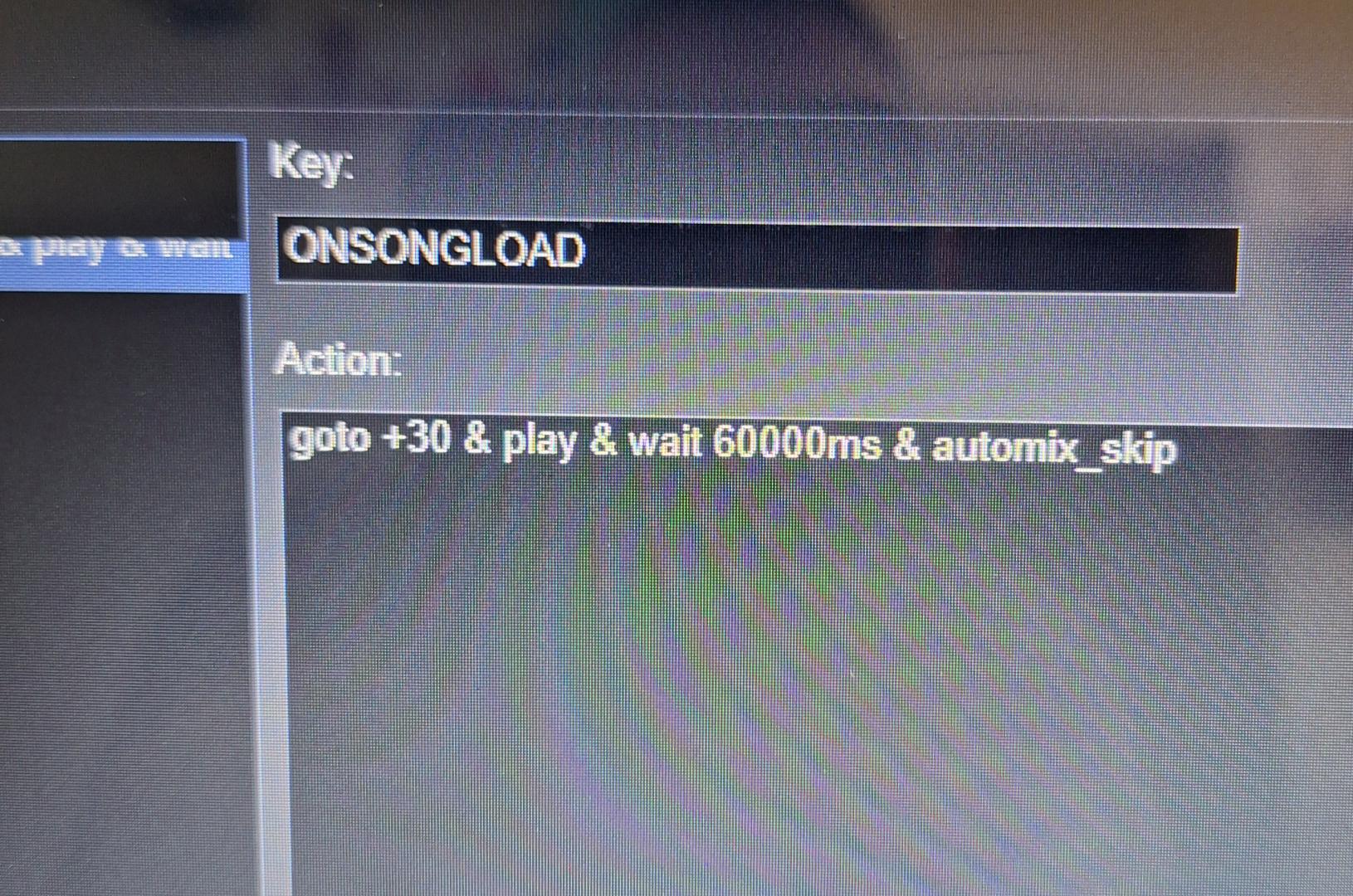
Mensajes Wed 22 Jul 26 @ 11:24 am
DBEntertainment
DBEntertainment wrote :
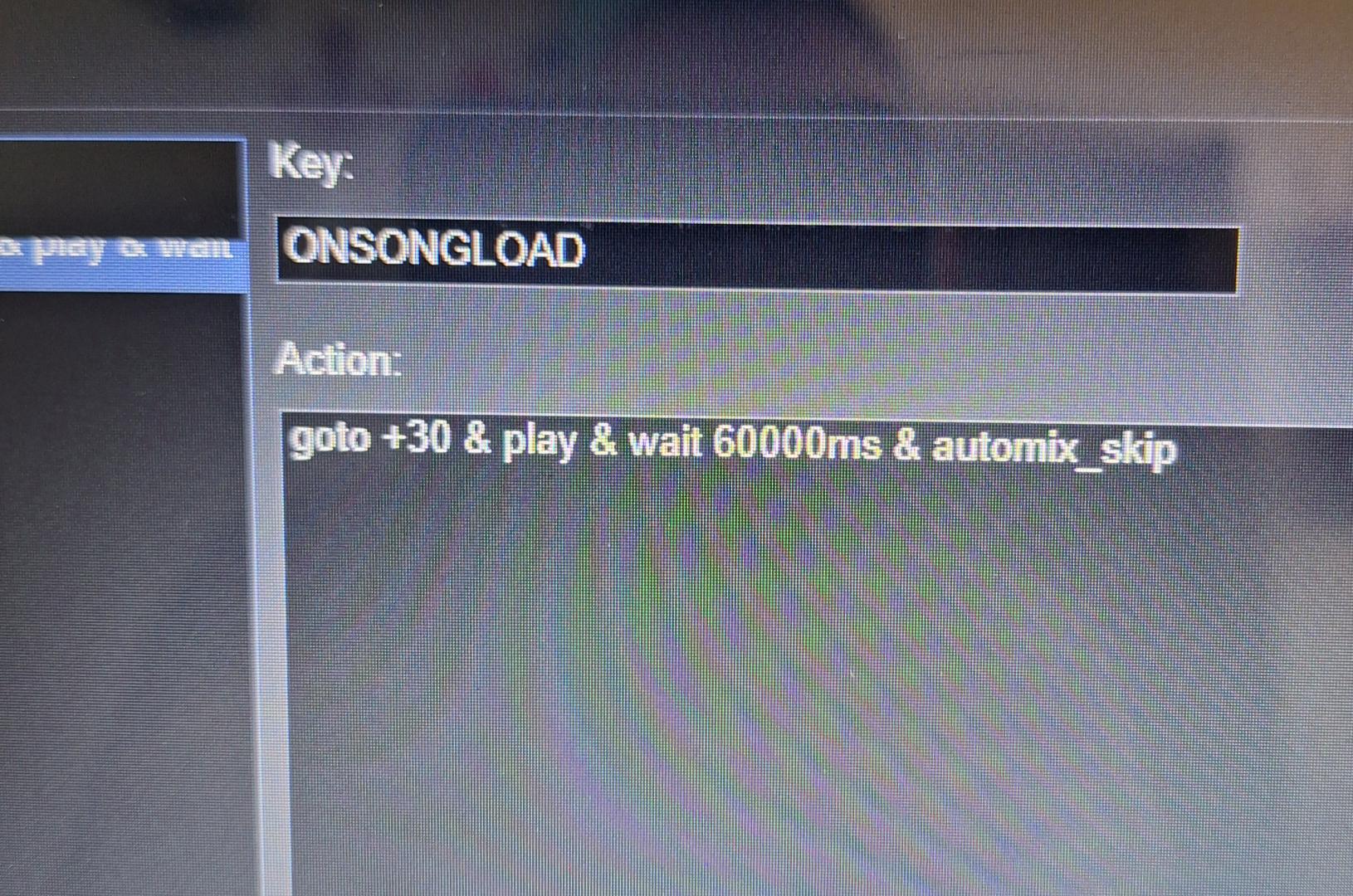
Thanks everyone for your help and input. I think I pretty much got it figured out to do what I want it to. Only small issue I have with this is when it skips to the next song, for a split second it automixes the beginning of the song, but then skips to the 30sec mark like I want. Not really a big deal and the common bar fly bingo player isn't going to notice.
Mensajes Wed 22 Jul 26 @ 11:26 am
 PhantomDeejay
Just FYI:
goto +30 goes 30 beats ahead from the current position, not on the 30 seconds timestamp.
That would be goto 30000ms while goto +30000ms would move you forward (from the current pos) by 30 secs.
goto +30 goes 30 beats ahead from the current position, not on the 30 seconds timestamp.
That would be goto 30000ms while goto +30000ms would move you forward (from the current pos) by 30 secs.
Mensajes Wed 22 Jul 26 @ 12:38 pm