


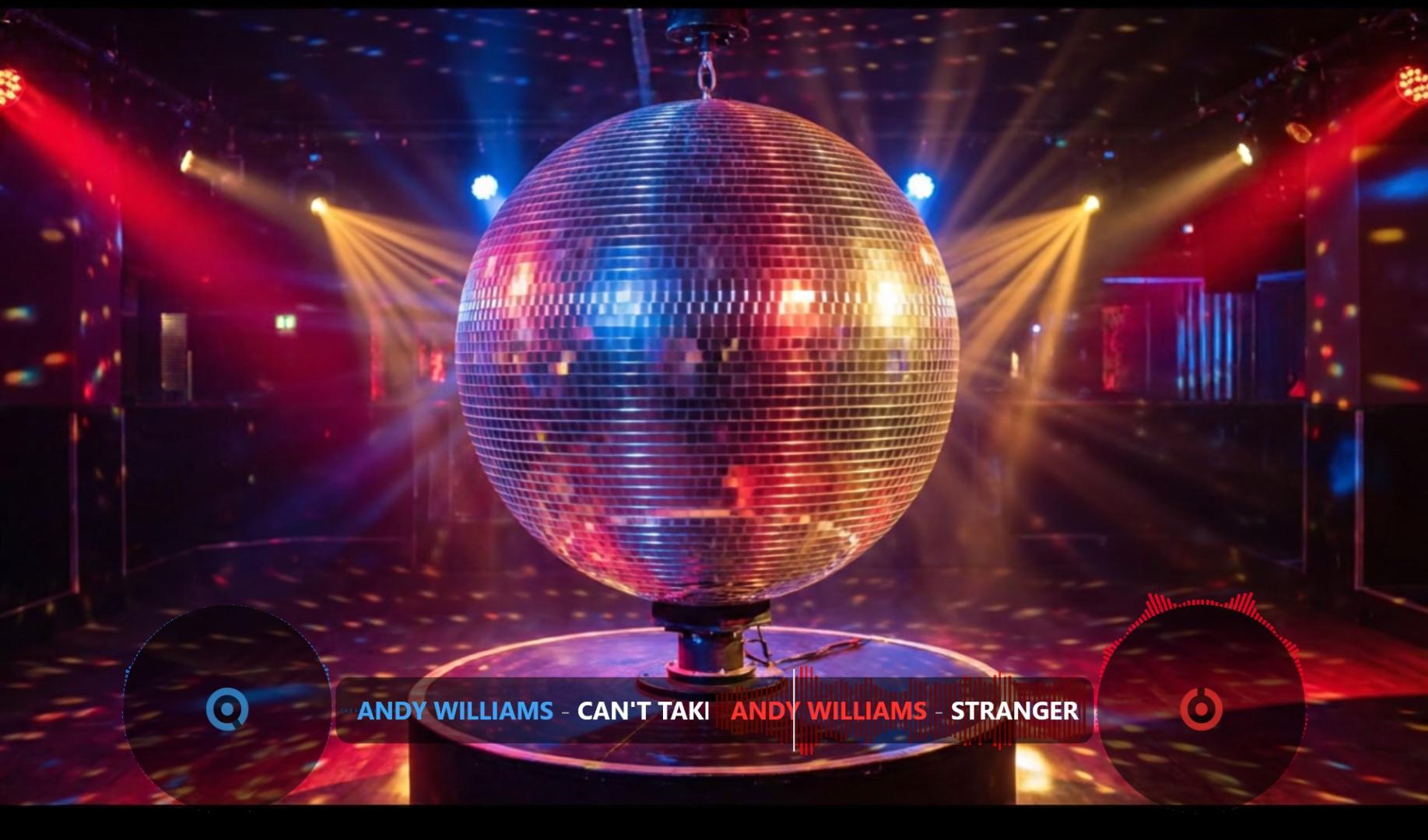
I have a request and a question, whether something can be done about it to make everything look better. Option cleanTagsInDeckDisplay - Yes. I play Automix and Video with Subtitles. Because showing it off like that at a wedding looks ugly and not aesthetically pleasing.
Mensajes Mon 17 Aug 26 @ 7:43 am
 MacGyverGear
It looks like you have activated both players; is that intentional? This is how my Video Overlay looks like:
https://youtu.be/fjA4J6JZGew
I don't know how you managed this? But there are so many different users.. and preferences..
Fortunately there is a lot that can be adjusted in Virtual DJ if users have very demanding requirements. For this you'll need to invest time in editing the code of the skin.. but it can be so much fun achieving this yourself!! Only then you'll create something unique. Your own Visual Identity!!
There's so much possible. I never been into the Video Overlay editing as I barely use a beamer or separate screen anymore but edited some basic stuff like fontsize in the main User Interface skin and the layout on my Denon Prime 4+. It took some weeks of spare time but it was so much fun. And I didn't had to bother anybody with my questions. Just trial and error.. ;-)
The: "Give a man a fish... / teach him how to fish.." phrase is quite compatible here.. But fortunately there's a lot of Virtual DJ users willing to help and learn. That is when you realize you shouldn't be too demanding, and espacially not to the writers of this program, who made so freakin much available.
For example look into these topics and be amazed:
https://virtualdj.com/forums/242049/VirtualDJ_Skins/Help_creating_a_video_skin.html
https://virtualdj.com/forums/261897/General_Discussion/Automated_video.html
https://youtu.be/fjA4J6JZGew
I don't know how you managed this? But there are so many different users.. and preferences..
Fortunately there is a lot that can be adjusted in Virtual DJ if users have very demanding requirements. For this you'll need to invest time in editing the code of the skin.. but it can be so much fun achieving this yourself!! Only then you'll create something unique. Your own Visual Identity!!
There's so much possible. I never been into the Video Overlay editing as I barely use a beamer or separate screen anymore but edited some basic stuff like fontsize in the main User Interface skin and the layout on my Denon Prime 4+. It took some weeks of spare time but it was so much fun. And I didn't had to bother anybody with my questions. Just trial and error.. ;-)
The: "Give a man a fish... / teach him how to fish.." phrase is quite compatible here.. But fortunately there's a lot of Virtual DJ users willing to help and learn. That is when you realize you shouldn't be too demanding, and espacially not to the writers of this program, who made so freakin much available.
For example look into these topics and be amazed:
https://virtualdj.com/forums/242049/VirtualDJ_Skins/Help_creating_a_video_skin.html
https://virtualdj.com/forums/261897/General_Discussion/Automated_video.html
Mensajes Mon 17 Aug 26 @ 10:09 am
 kradcliffe
Are you using automixDualdeck?
Mensajes Mon 17 Aug 26 @ 10:13 am
 locoDog
Of course he is, more selbstgemachtes leid
Mensajes Mon 17 Aug 26 @ 10:24 am
kradcliffe
That feature is technically deprecated hence the reason the video skin isn't displaying properly. Just as well I'm kinda OK with German :)
Mensajes Mon 17 Aug 26 @ 10:53 am
kradcliffe wrote :
Are you using automixDualdeck?
Yes
Mensajes Mon 17 Aug 26 @ 11:32 am
kradcliffe wrote :
That feature is technically deprecated hence the reason the video skin isn't displaying properly. Just as well I'm kinda OK with German :)
If it is outdated, someone in the program should either fix it so that it works properly or remove it completely.
Mensajes Mon 17 Aug 26 @ 11:36 am
locoDog wrote :
Of course he is, more selbstgemachtes leid
I have a request for you because I see that you are familiar with the topic. Can you help me and edit the skin to display correctly? Thank you in advance.
Mensajes Mon 17 Aug 26 @ 11:45 am
Adion
Even with dual deck automix, the overlay should only show one title if one song is playing.
Mensajes Mon 17 Aug 26 @ 11:46 am
MacGyverGear
Perhaps he's playing both songs at the same time.. and the x fader in mid position..
Anyway.. no problem when I switch here.. (and both tracks are playing) https://youtu.be/fjA4J6JZGew
Anyway.. no problem when I switch here.. (and both tracks are playing) https://youtu.be/fjA4J6JZGew
Mensajes Mon 17 Aug 26 @ 11:47 am
Adion wrote :
Even with dual deck automix, the overlay should only show one title if one song is playing.
You're right, the only problem is how two songs overlap in the automix.
Mensajes Mon 17 Aug 26 @ 11:49 am
Adion
It's intentional in the default video overlay that it shows both titles during the transition, so if you don't like that, you have to edit the overlay or create your own.
Mensajes Mon 17 Aug 26 @ 11:50 am
Adion wrote :
It's intentional in the default video overlay that it shows both titles during the transition, so if you don't like that, you have to edit the overlay or create your own.
I have a request for you because I see that you are familiar with the topic. Can you help me and edit the skin to display correctly? Thank you in advance. Don't you think it shouldn't be like that?
Mensajes Mon 17 Aug 26 @ 11:52 am
MacGyverGear wrote :
Perhaps he's playing both songs at the same time.. and the x fader in mid position..
Anyway.. no problem when I switch here.. (and both tracks are playing) https://youtu.be/fjA4J6JZGew
Anyway.. no problem when I switch here.. (and both tracks are playing) https://youtu.be/fjA4J6JZGew
Automix isn't working for you.
Mensajes Mon 17 Aug 26 @ 12:00 pm
MacGyverGear
Krzysztof Grzelak wrote :
Automix isn't working for you.
MacGyverGear wrote :
Perhaps he's playing both songs at the same time.. and the x fader in mid position..
Anyway.. no problem when I switch here.. (and both tracks are playing) https://youtu.be/fjA4J6JZGew
Anyway.. no problem when I switch here.. (and both tracks are playing) https://youtu.be/fjA4J6JZGew
Automix isn't working for you.
Automix isn't a problem for me. I use it all the time but I don't use the Video Overlay. However I found how you've managed to have both players in the Video Overlay. I would suggest to turn the X fader to the player running the Automix.
https://youtu.be/65tEiJLbcYI
Mensajes Mon 17 Aug 26 @ 12:21 pm
MacGyverGear
I didn't even know about Automix Dualdeck mixing..
I think the stock Video Overlay looks pretty smooth with this setting: https://youtu.be/NCmLY0ki9Fs
You can turn 'autoMixDualdeck' off, if you don't want the transition to be shown.. or alternatively, you should invest some time in how to create your own skin (like already suggested by Adion and some topics in my previous post)..
I think the stock Video Overlay looks pretty smooth with this setting: https://youtu.be/NCmLY0ki9Fs
You can turn 'autoMixDualdeck' off, if you don't want the transition to be shown.. or alternatively, you should invest some time in how to create your own skin (like already suggested by Adion and some topics in my previous post)..
Mensajes Mon 17 Aug 26 @ 12:38 pm
 groovindj
Automix has been single deck by default since 2007.
Mensajes Mon 17 Aug 26 @ 12:51 pm
MacGyverGear
I'm wondering if the Topic Starter is even aware of customized VideoSkins, made available by the Virtual DJ community..
https://youtu.be/iZTFaw0jUhg
https://youtu.be/iZTFaw0jUhg
Mensajes Mon 17 Aug 26 @ 1:12 pm
Thank you very much for all the information and suggestions. I think the programme’s developers will fix these issues in the next update, and it doesn’t matter that it’s no longer in use.
Mensajes Mon 17 Aug 26 @ 4:45 pm
 DJ VinylTouch
Krzysztof wrote :
it doesn’t matter that it’s no longer in use.
Actually it does - you're technically using the skin in a way it wasn't designed for.
What persons told you here is the correct way forward (use one deck for automix with the skin), and while the skin could be corrected to display the overlap better, listening to what the correct use case is supposed to be is a requirement for help on the forum.
Mensajes Mon 17 Aug 26 @ 5:26 pm
