


 Said Enough
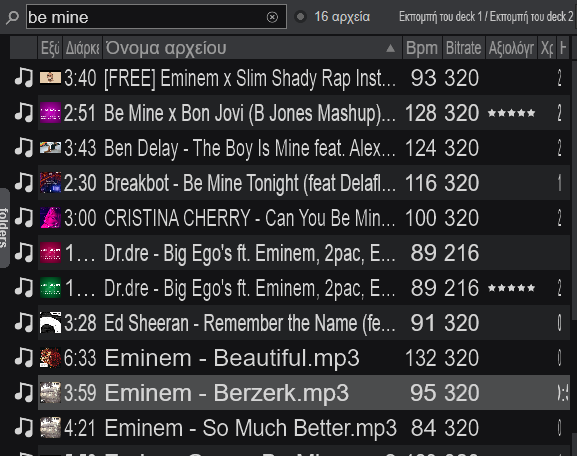
hello i have an issue i search be mine and random songs pop up like eminem berzerk i cannot fix it i changed search options to file name only and still random songs come up i also checked for possible tags that in the eminems song but nothing close to be mine and it happens with other searches aswell please if anyone knows the answer help me thank you
Mensajes Sat 05 Sep 26 @ 6:03 pm
 locoDog
eminem berzerk
do you see why it's picking up?
do you see why it's picking up?
Mensajes Sat 05 Sep 26 @ 6:11 pm
Said Enough
yeah but this doesnt make sense,a lot of songs can have these letters inside, can i make it somehow more strict?
Mensajes Sun 06 Sep 26 @ 6:10 pm
 groovindj
Well what exactly are you searching for? What is the full artist and title?
It's always better to search for something distinctive or unique rather than short words like 'be'.
It's always better to search for something distinctive or unique rather than short words like 'be'.
Mensajes Sun 06 Sep 26 @ 7:24 pm
locoDog
Use double commas
"be mine"
Mensajes Sun 06 Sep 26 @ 7:28 pm
 DJ VinylTouch
Related but unrelated, is there a way to pick an exact column to match against in the search syntax (e.g. %title="exact string")?
Mensajes Sun 06 Sep 26 @ 7:36 pm
locoDog
searched fields is a number flag system, like this [not real flags here]
artist = 1
title = 2
remix = 4
therefore
artist + title = 3
the setting is searchFields
artist = 1
title = 2
remix = 4
therefore
artist + title = 3
the setting is searchFields
Mensajes Sun 06 Sep 26 @ 8:05 pm
DJ VinylTouch
So that I already knew, but what I mean is an explicit, temporary override, completely specified in the seach query itself - I'm guessing that's a no?
Mensajes Sun 06 Sep 26 @ 8:11 pm
locoDog
That all there is as far as I know.
Mensajes Sun 06 Sep 26 @ 8:30 pm
groovindj
If it was possible in the search options dropdown list to 'solo' title (for example) it would save having to keep reopening that menu to remove all the ticks - which is a pain because it closes each time.
Normally I have about ten ticked, so removing nine to search for one is impractical.
Normally I have about ten ticked, so removing nine to search for one is impractical.
Mensajes Sun 06 Sep 26 @ 8:53 pm
 PhantomDeejay
The answer is simple
If your search query is too broad, you can use double quotes (") to make the query return exact matches.
The funny thing is that for most purposes you don't even need to close the quotes.
"be mine will return all tracks that contain exactly the string "be mine" in any of the available search fields.
No, you cannot override search temporarily, to search one particular field only.
However, since "searchFileds" is an option, you could create some custom button(s) to provide similar behavior if you think you need it that bad.
Open settings, and search for "searchFields" option.
Mark the number it shows. In my case it's 40895
Make a custom button like this:
setting 'searchFields' 40895 ? setting 'searchFields' 0 : setting 'searchFields' 40895
In order to use:
Click the custom button once. It should clear all options.
Use the mouse to pick a particular field to search (e.g. title)
Do your search.
After you're done, click the custom button again to set back all your favorite search fields.
I'm sure that Locodog can trim this process to use some variable to store and recall the current search fields, thus eliminating the need to find the value from the settings and hardcode it.
PS: Although I have not needed this so far, so I doubt I will ever need it in the future, this is actually a valid whishlist item.
So anyone that needs it, feel free to post it on the WISHES forum.
Something like %title% be mine would be fine I guess for a temporary override. You don't even need the equation mark (=) since the tag on front would provide the necessary logic.
If your search query is too broad, you can use double quotes (") to make the query return exact matches.
The funny thing is that for most purposes you don't even need to close the quotes.
"be mine will return all tracks that contain exactly the string "be mine" in any of the available search fields.
No, you cannot override search temporarily, to search one particular field only.
However, since "searchFileds" is an option, you could create some custom button(s) to provide similar behavior if you think you need it that bad.
Open settings, and search for "searchFields" option.
Mark the number it shows. In my case it's 40895
Make a custom button like this:
setting 'searchFields' 40895 ? setting 'searchFields' 0 : setting 'searchFields' 40895
In order to use:
Click the custom button once. It should clear all options.
Use the mouse to pick a particular field to search (e.g. title)
Do your search.
After you're done, click the custom button again to set back all your favorite search fields.
I'm sure that Locodog can trim this process to use some variable to store and recall the current search fields, thus eliminating the need to find the value from the settings and hardcode it.
PS: Although I have not needed this so far, so I doubt I will ever need it in the future, this is actually a valid whishlist item.
So anyone that needs it, feel free to post it on the WISHES forum.
Something like %title% be mine would be fine I guess for a temporary override. You don't even need the equation mark (=) since the tag on front would provide the necessary logic.
Mensajes Mon 07 Sep 26 @ 7:13 am
groovindj
Thanks George 👍
Mensajes Mon 07 Sep 26 @ 8:16 am
PhantomDeejay
Now that I'm thinking of it, you could even create a few "presets"
Just setup everything according to your liking, mark the searchFields number, and create a button that cycles all the numbers (presets) you want/like
Just setup everything according to your liking, mark the searchFields number, and create a button that cycles all the numbers (presets) you want/like
Mensajes Mon 07 Sep 26 @ 8:57 am
DJ VinylTouch
So @PhantomDeejay I did think of this as an option already, once I figured out what the searchFields option represented and how.
However, that is still at least one (or more = making the custom button/mapping to narrow the search and return it to default on toggle) extra step outside of the search box.
For example, even MIXXX allows you to narrow the search matching by a few columns using the syntax <lower case column name>: "search criteria", to only consider that field with the query and -<lower case column name>: "search criteria" to negate that match.
See Using searching operators here:
https://manual.mixxx.org/2.5/en/chapters/library.html
However, that is still at least one (or more = making the custom button/mapping to narrow the search and return it to default on toggle) extra step outside of the search box.
For example, even MIXXX allows you to narrow the search matching by a few columns using the syntax <lower case column name>: "search criteria", to only consider that field with the query and -<lower case column name>: "search criteria" to negate that match.
See Using searching operators here:
https://manual.mixxx.org/2.5/en/chapters/library.html
Mensajes Mon 07 Sep 26 @ 11:47 am
PhantomDeejay
As I said, this is IMHO a valid Wish List item.
So, go ahead on the Wishes forum and ask for it.
In the meanwhile a temporary "kind of" solution does exist, if you absolutely need to narrow down a search this way.
I'm using VirtualDJ for more than 20 years now, and I use search countless times per gig.
I have never found myself in a place that I wished I could narrow down a search just by a particular field. It is highly unlikely that I will find myself needing this now. And given how powerful VirtualDJ search is, I don't think that the vast majority of users needs it either, or it would have been asked already hundreds of times.
So, even after implementing, it will most likely remain a niche functionality. One of those things that are "nice to have" but you never actually use :P
But that's just me and how I operate.
As I said.. If you want it, ask for it! :)
So, go ahead on the Wishes forum and ask for it.
In the meanwhile a temporary "kind of" solution does exist, if you absolutely need to narrow down a search this way.
I'm using VirtualDJ for more than 20 years now, and I use search countless times per gig.
I have never found myself in a place that I wished I could narrow down a search just by a particular field. It is highly unlikely that I will find myself needing this now. And given how powerful VirtualDJ search is, I don't think that the vast majority of users needs it either, or it would have been asked already hundreds of times.
So, even after implementing, it will most likely remain a niche functionality. One of those things that are "nice to have" but you never actually use :P
But that's just me and how I operate.
As I said.. If you want it, ask for it! :)
Mensajes Mon 07 Sep 26 @ 11:58 am
DJ VinylTouch
I agree it's a nice to have but very niche.
I'll make a Feature Request for it (I've unfortunately hijacked this post in the process, apologies to OP).
I'll make a Feature Request for it (I've unfortunately hijacked this post in the process, apologies to OP).
Mensajes Mon 07 Sep 26 @ 12:03 pm
groovindj
Not quite 20 years here yet, but ditto - if I'm searching for a title, I know it's the title so I know which column to look at when the results appear. As mentioned in another recent post, I also try to search for the more distinctive words if possible, rather than ubiquitous ones.
It's more common for me to think of a track, but forget the artist or title, so I'm stuck in limbo. 🤣
It's more common for me to think of a track, but forget the artist or title, so I'm stuck in limbo. 🤣
Mensajes Mon 07 Sep 26 @ 12:55 pm